Scripting on HELIX Character Creator
The HELIX Character Creator exposes all clothing, body, and appearance functionality through two C++ interfaces. Both are blueprint exposed, so every function below is callable from Blueprint and from Lua with no wrapper layer.
IHCharacterCosmetics- implemented by the character pawn. Mesh access, identity, and the entry point to the cosmetics system.IHCosmeticsSystem- the cosmetics system itself. All clothing query/equip/override/visibility logic lives here.
You always start from a character reference, fetch its cosmetics system once, then call the system functions directly.
Accessing Item IDs#
You can get runtime IDs for wearable items by clicking Copy ID button under corresponding entry inside your data asset. Those IDs can be used while equipping items or running other kind of queries on the IHCosmeticsSystem interface.
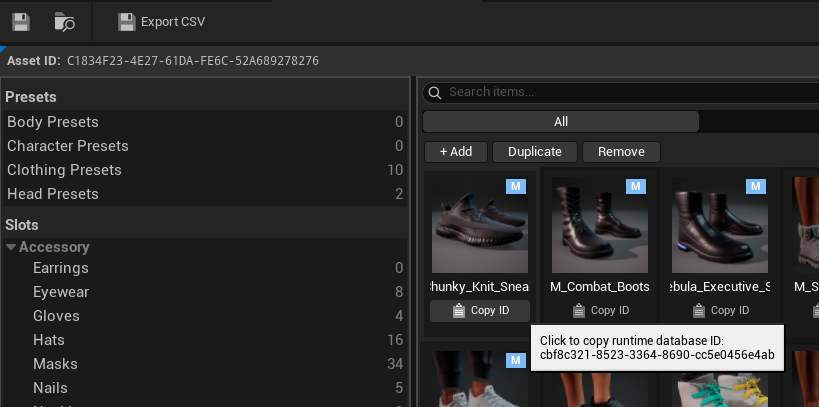
Unique IDs
Those IDs are generated by name of your entry shown on the tile, and Asset ID value of your data asset, which is shown at the top of your data asset. Changing either of those values will cause item ID to get invalidated.
Access pattern#
The clothing API is not on the character, it's an actor component attached to character instead. The character only exposes mesh/identity data and GetCosmeticsSystem(). Every clothing operation is two hops:
-- `Character` is the pawn (implements IHCharacterCosmetics).
local System = Character:GetCosmeticsSystem()
if not System then
    -- Cosmetics system not yet attached (e.g. NPC with no CC, or pre-init).
    return
end

System:EquipCosmeticItem('ee0dd5a7-24e8-3192-a308-e9fb78e12491') -- Database ID for M_Top_1 clothing
GetCosmeticsSystem() returns a TScriptInterface<IHCosmeticsSystem>. In UnLua you call its functions directly with :, no manual cast required.
Initial load
Cosmetics are streamed asynchronously. Before the first load completes, the system may be absent or the loadout might be empty. Gate early access with IsInitialCosmeticsLoadDone function and wait for first OnCosmeticsUpdated delegate callback to ensure cosmetics are initialized properly.
Building gameplay tags#
Most of the API is tag-driven (slot identifiers, hide requests, bulk clears). You can build tags as shown below.
local TagUtility = UE.UHelixResourceUtility
local TopSlot = TagUtility.RequestGameplayTag('Cosmetic.Slot.Clothing.Top')
local function MakeTagContainer(tagNames)
    local TagUtility = UE.UHelixResourceUtility
    local arr = {}
    for _, name in ipairs(tagNames) do
        table.insert(arr, TagUtility.RequestGameplayTag(name))
    end
    return UE.UBlueprintGameplayTagLibrary.MakeGameplayTagContainerFromArray(arr)
end

local ClothingTags = MakeTagContainer({
    'Cosmetic.Slot.Clothing.Top',
    'Cosmetic.Slot.Clothing.Bottoms',
})
A small local Tag(name) / MakeTagContainer(names) helper at the top of your script keeps the rest of the code readable. The examples below assume those helpers exist.
Cosmetic slots#
Every wearable, body mesh, and appearance layer occupies exactly one slot, identified by a gameplay tag under Cosmetic.Slot. Equipping an item resolves its slot from the database; equipping into an occupied slot replaces the previous item.
Body - modular base meshes#
| Tag | Description |
|---|---|
Cosmetic.Slot.Body.Head |
Base head mesh. |
Cosmetic.Slot.Body.Upper |
Base upper body (torso and arms). |
Cosmetic.Slot.Body.Lower |
Base lower body (hips and legs). |
Cosmetic.Slot.Body.Hands |
Base hands mesh. |
Cosmetic.Slot.Body.Feet |
Base feet mesh. |
Clothing - wearable garments#
| Tag | Description |
|---|---|
Cosmetic.Slot.Clothing.Top |
Primary upper body clothing. |
Cosmetic.Slot.Clothing.Bottoms |
Lower body clothing. |
Cosmetic.Slot.Clothing.Set |
Full-body outfit; typically hides other clothing slots. |
Cosmetic.Slot.Clothing.Backpack |
Back attachment item. |
Cosmetic.Slot.Clothing.Socks |
Layer under shoes. |
Cosmetic.Slot.Clothing.Shoes |
Footwear; typically hides the base feet mesh. |
Cosmetic.Slot.Clothing.Underwear.Top |
Upper underwear layer. |
Cosmetic.Slot.Clothing.Underwear.Bottom |
Lower underwear layer. |
Cosmetic.Slot.Clothing.Underwear.Leg |
Secondary lower layer (tights, stockings). |
Accessory - attached props, grouped by body zone#
| Tag | Description |
|---|---|
Cosmetic.Slot.Accessory.Head.Hat |
Headwear item. |
Cosmetic.Slot.Accessory.Face.Mask |
Face covering item. |
Cosmetic.Slot.Accessory.Face.Eyewear |
Glasses or sunglasses. |
Cosmetic.Slot.Accessory.Neck.Necklace |
Neck accessory. |
Cosmetic.Slot.Accessory.Ears.Earrings |
Ear accessory. |
Cosmetic.Slot.Accessory.Hands.Gloves |
Hand covering item. |
Cosmetic.Slot.Accessory.Hands.Nails |
Nail mesh or material. |
Appearance - non-mesh visual layers#
| Tag | Description |
|---|---|
Cosmetic.Slot.Appearance.Hair.Main |
Main hair style. |
Cosmetic.Slot.Appearance.Hair.Facial.Beard |
Facial hair on chin and jaw. |
Cosmetic.Slot.Appearance.Hair.Facial.Mustache |
Facial hair above the lip. |
Cosmetic.Slot.Appearance.Eyes.Eyebrows |
Eyebrow appearance. |
Cosmetic.Slot.Appearance.Eyes.Eyelashes |
Eyelash appearance. |
Cosmetic.Slot.Appearance.Eyes.Iris |
Eye iris texture or color. |
Cosmetic.Slot.Appearance.Skin.BodyTattoo |
Body tattoo or decal. |
Cosmetic.Slot.Appearance.Skin.FaceTattoo |
Face tattoo or decal. |
Cosmetic.Slot.Appearance.Makeup.Lipstick |
Lip color layer. |
Cosmetic.Slot.Appearance.Makeup.Eyeliner |
Eyeliner layer. |
Cosmetic.Slot.Appearance.Makeup.Eyeshadow |
Eyeshadow layer. |
Cosmetic.Slot.Appearance.Makeup.Blush |
Blush layer. |
Custom#
| Tag | Description |
|---|---|
Cosmetic.Slot.Custom |
Custom full-body mesh slot. Overrides the modular body. |
Parent tags as filters
Slot tags are hierarchical. Passing a parent tag (e.g. Cosmetic.Slot.Clothing) to a filter or bulk operation matches every child slot beneath it. This is the basis for ClearCosmeticSlotsUnderTags and the FilterSlotTags parameter on GetEquippedItemIDs.
Enums#
EHCharacterCosmeticsGender#
Male, Female. (None is internal.)
EHCosmeticBodyType#
Underweight, Average. (Overweight is defined but not currently supported.)
EHMaterialParameter#
Scalar, Color. Used when constructing material parameter overrides.
local gender = UE.EHCharacterCosmeticsGender.Female
local body   = UE.EHCosmeticBodyType.Average
Querying the loadout#
GetCosmeticLoadout#
Returns the full FHCosmeticLoadout struct by value (gender, body type, slot entries, runtime hide counters).
local Loadout = System:GetCosmeticLoadout()
print('Gender:', Loadout.Gender)
local Slots = Loadout.Slots          -- TArray<FHCosmeticSlotEntry>
for i = 1, Slots:Length() do
    local Entry = Slots:Get(i)
    print(Entry.SlotTag.TagName, Entry.ItemID)
end
GetEquippedSlotTags#
Returns the slot tags that currently hold a non-empty item.
local Tags = System:GetEquippedSlotTags() -- TArray<FGameplayTag>
GetEquippedItemIDs#
Returns equipped item IDs in slot order. Pass an empty container for all slots, or a filter container to restrict to specific slots (parent tags match all children).
local ClothingFilter = MakeTagContainer({ 'Cosmetic.Slot.Clothing' })
local ItemIDs = System:GetEquippedItemIDs(ClothingFilter)
local All = System:GetEquippedItemIDs(UE.FGameplayTagContainer())
IsCosmeticItemEquipped#
Returns true if the given item ID is equipped in any slot.
if System:IsCosmeticItemEquipped('ee0dd5a7-24e8-3192-a308-e9fb78e12491') then -- Database ID for M_Top_1 clothing
    -- ...
end
FindSlotForCosmeticItem#
Returns the slot tag holding the given item ID, or an empty tag if not equipped.
local Slot = System:FindSlotForCosmeticItem('Sneakers_White_01')
GetCosmeticSlotEntry#
Returns the FHCosmeticSlotEntry for a slot tag, or a default-constructed empty entry. Check entry.ItemID (empty means the slot is unoccupied).
local Entry = System:GetCosmeticSlotEntry(Tag('Cosmetic.Slot.Clothing.Top'))
if Entry.ItemID ~= '' then
    print('Top item:', Entry.ItemID)
end
GetCosmeticGender / GetCosmeticBodyType#
Return the loadout's current gender and body type.
local gender = System:GetCosmeticGender()
local body   = System:GetCosmeticBodyType()
IsSlotActive#
Returns true if the slot currently holds a database item.
local hasHat = System:IsSlotActive(Tag('Cosmetic.Slot.Accessory.Head.Hat'))
IsSlotHidden#
Returns true if the slot is hidden by another equipped slot (e.g. a full Set hiding Top/Bottoms).
local hidden = System:IsSlotHidden(Tag('Cosmetic.Slot.Clothing.Top'))
IsRuntimeHidden#
Returns true if the slot has any outstanding runtime hide request (see Runtime visibility).
local r = System:IsRuntimeHidden(Tag('Cosmetic.Slot.Accessory.Head.Hat'))
IsCustomSlotActive#
Returns true if the character has a custom full-body mesh assigned.
local isCustom = System:IsCustomSlotActive()
Equipping and unequipping#
Equip calls are asynchronous
Equip functions return as soon as the request is dispatched, not when the item is applied. A true return means the request was accepted (item ID non-empty); it does not guarantee the item exists in the database, and the loadout will not reflect the change until DB lookup and asset streaming complete. Do not query the loadout immediately after equipping and expect the new state. Instead, bind to OnCosmeticsUpdated: it fires once the requested change has been applied to the character, with the resulting loadout. This is the correct way to sequence logic that depends on an equip/unequip having taken effect.
EquipCosmeticItem#
Equip a single item by its database ID. The slot is resolved from the DB entry; any existing item in that slot is replaced.
System:EquipCosmeticItem('ee0dd5a7-24e8-3192-a308-e9fb78e12491') -- Database ID for M_Top_1 clothing
EquipCosmeticItemWithOverrides#
Equip an item with material parameter overrides applied atomically at equip time.
local Tint = UE.FHCosmeticParamRuntimeOverride()
Tint.ParamName        = 'Tint'
Tint.MaterialSlotName = 'None'                       -- empty = all material slots
Tint.Type             = UE.EHMaterialParameter.Color
Tint.ColorValue       = UE.FLinearColor(0.8, 0.1, 0.1, 1.0)

local Overrides = UE.TArray(UE.FHCosmeticParamRuntimeOverride)
Overrides:Add(Tint)

System:EquipCosmeticItemWithOverrides('TShirt_Plain_01', Overrides)
EquipCosmeticItems#
Equip multiple items in one batch. More efficient than looping EquipCosmeticItem (DB lookups and mesh streaming are coalesced). Items resolving to the same slot follow last-wins ordering.
local Items = UE.TArray(UE.FString)
Items:Add('ee0dd5a7-24e8-3192-a308-e9fb78e12491')   -- Cosmetic.Slot.Clothing.Top. Database ID for M_Top_1 clothing
Items:Add('5e3620d7-0853-3831-80d1-b45092b0f785')   -- Cosmetic.Slot.Clothing.Bottoms. Database ID for M_Bottoms_Black_Short clothing
Items:Add('fb7b19ef-493b-36e9-8e1b-5de70db5e976')   -- Cosmetic.Slot.Clothing.Shoes. Database ID for M_Shoes_Out_Boots clothing
Items:Add('7e9ffbdd-4916-374f-9a35-86c73b0b9232')   -- Cosmetic.Slot.Accessory.Head.Hat. Database ID for M_Hat_Cap clothing.

System:EquipCosmeticItems(Items)
UnequipCosmeticItem#
Unequip the given item ID if equipped. Returns true if it was found and removed.
System:UnequipCosmeticItem('7e9ffbdd-4916-374f-9a35-86c73b0b9232') -- Database ID for M_Hat_Cap clothing.
UnequipCosmeticSlot#
Unequip whatever is in the given slot. No-op if the slot is empty.
System:UnequipCosmeticSlot(Tag('Cosmetic.Slot.Accessory.Face.Eyewear'))
Bulk operations#
ClearCosmeticSlotsUnderTags#
Clear every slot that is a child of (or equal to) one of the given parent tags. Body base meshes are untouched unless you explicitly pass a body parent tag.
local Parents = MakeTagContainer({ 'Cosmetic.Slot.Clothing' })
System:ClearCosmeticSlotsUnderTags(Parents)
local Parents = MakeTagContainer({
    'Cosmetic.Slot.Clothing',
    'Cosmetic.Slot.Accessory',
})
System:ClearCosmeticSlotsUnderTags(Parents)
ClearAllCosmeticSlots#
Clear every accessory, clothing, and appearance slot. Body base meshes are preserved.
System:ClearAllCosmeticSlots()
ResetCosmeticsToDefaults#
Reset the loadout to engineering defaults for a gender and body type.
System:ResetCosmeticsToDefaults(
    UE.EHCharacterCosmeticsGender.Male,
    UE.EHCosmeticBodyType.Average
)
Identity#
SetCosmeticGender#
Set loadout gender. May swap the base skeletal mesh and trigger a rebuild.
System:SetCosmeticGender(UE.EHCharacterCosmeticsGender.Female)
SetCosmeticBodyType#
Set loadout body type.
System:SetCosmeticBodyType(UE.EHCosmeticBodyType.Average)
Material parameter overrides#
Overrides tint or adjust the material of an equipped item without changing the item itself. MeshMaterialSlotName is usually the material index as a name ('0', '1', …); pass 'None' to affect all materials on the mesh. All override functions no-op if the target slot is empty.
SetMaterialColorOverrideForSlot#
Set or replace a color override on a named parameter for a slot.
System:SetMaterialColorOverrideForSlot(
    Tag('Cosmetic.Slot.Clothing.Top'),
    'Tint',                                  -- ParamName
    'None',                                  -- MeshMaterialSlotName (all materials)
    UE.FLinearColor(0.8, 0.1, 0.1, 1.0)
)
SetMaterialScalarOverrideForSlot#
Set or replace a scalar override on a named parameter for a slot.
System:SetMaterialScalarOverrideForSlot(
    Tag('Cosmetic.Slot.Clothing.Shoes'),
    'Roughness',
    '0',                                     -- material slot index 0
    0.85
)
RemoveMaterialOverrideFromSlot#
Remove a single named override from a slot. Returns true if found and removed.
System:RemoveMaterialOverrideFromSlot(
    Tag('Cosmetic.Slot.Clothing.Top'),
    'Tint',
    'None'
)
ClearMaterialOverridesFromSlot#
Remove all overrides from a slot, reverting to database defaults.
System:ClearMaterialOverridesFromSlot(Tag('Cosmetic.Slot.Clothing.Top'))
Runtime slot visibility#
Runtime hide requests temporarily hide a slot without unequipping it. Requests are refcounted: multiple systems can independently request the same slot be hidden, and the slot reappears only when every push has been matched by a pop. Use this for transient states (entering a vehicle, a cutscene, a helmet toggle) rather than permanent changes.
Always match push with pop
Every PushRuntimeHideRequest must be balanced by a PopRuntimeHideRequest. Leaking pushes leaves slots stuck hidden. Use ClearRuntimeHideRequests only as a deliberate reset, and ClearAllRuntimeHideRequests only as an emergency clear.
PushRuntimeHideRequest#
Add a hide request for the given slots (increments their counters).
local Tags = MakeTagContainer({
    'Cosmetic.Slot.Accessory.Head.Hat',
    'Cosmetic.Slot.Appearance.Hair.Main',
})
System:PushRuntimeHideRequest(Tags)
PopRuntimeHideRequest#
Release one outstanding hide request per slot (decrements, clamped at zero).
System:PopRuntimeHideRequest(Tags)
ClearRuntimeHideRequests#
Force the counter for the given slots to zero, ignoring outstanding requests.
System:ClearRuntimeHideRequests(Tags)
ClearAllRuntimeHideRequests#
Force every runtime hide counter back to zero. Emergency clear.
System:ClearAllRuntimeHideRequests()
GetRuntimeHiddenSlots#
Returns a FGameplayTagContainer of slot tags with at least one outstanding hide request.
local Hidden = System:GetRuntimeHiddenSlots()
GetRuntimeHideRequestCount#
Returns the outstanding hide request count for a single slot (0 if none).
local count = System:GetRuntimeHideRequestCount(
    Tag('Cosmetic.Slot.Accessory.Head.Hat')
)
Events#
The cosmetics system broadcasts multicast delegates when the loadout or identity changes, and when the dedicated customization UI opens and closes. Subscribe to react to changes instead of polling the loadout.
Keep the callback owner alive, and always unbind
The bound object (the first element of the pair) must outlive the binding. If it is garbage collected while still bound, the broadcast will fail or assert. Always Unbind in your teardown path (EndPlay, widget Destruct, etc.).
System:BindOnCosmeticsUpdated(function(NewLoadout)
    print('Loadout changed. Gender:', NewLoadout.Gender)
end)
OnCosmeticsUpdated#
Fires after the cosmetic loadout changes, whether the change was local or arrived via replication. Callback receives the new FHCosmeticLoadout.
Because equip/unequip/override calls are asynchronous (see Equipping and unequipping), this is the signal that a requested change has actually been applied to the character. Bind to it instead of polling the loadout after an equip call.
Bind / unbind: BindOnCosmeticsUpdated(Delegate) / UnbindOnCosmeticsUpdated(Delegate)
System:BindOnCosmeticsUpdated(function(NewLoadout)
    print('Outfit changed. Gender:', NewLoadout.Gender, 'Body:', NewLoadout.BodyType)
end)
-- The equip is async; this callback runs when the new item is actually applied.
System:BindOnCosmeticsUpdated(function(NewLoadout)
    if System:IsCosmeticItemEquipped('7e9ffbdd-4916-374f-9a35-86c73b0b9232') then -- M_Hat_Cap
        -- safe to run logic that depends on the hat being on the character
    end
end)
System:EquipCosmeticItem('7e9ffbdd-4916-374f-9a35-86c73b0b9232')
OnCosmeticsGenderChanged#
Fires after the loadout gender changes. Callback receives the new EHCharacterCosmeticsGender.
Bind / unbind: BindOnCosmeticsGenderChanged(Delegate) / UnbindOnCosmeticsGenderChanged(Delegate)
System:BindOnCosmeticsGenderChanged(function(NewGender)
    print('Gender is now:', NewGender)
end)
OnCosmeticsBodyTypeChanged#
Fires after the loadout body type changes. Callback receives the new EHCosmeticBodyType.
Bind / unbind: BindOnCosmeticsBodyTypeChanged(Delegate) / UnbindOnCosmeticsBodyTypeChanged(Delegate)
System:BindOnCosmeticsBodyTypeChanged(function(NewBodyType)
    print('Body type is now:', NewBodyType)
end)
OnCosmeticsCustomizationStarted#
Fires after the character begins being edited in the dedicated customization UI. No parameters. Only fired on locally controlled clients.
Bind / unbind: BindOnCosmeticsCustomizationStarted(Delegate) / UnbindOnCosmeticsCustomizationStarted(Delegate)
System:BindOnCosmeticsCustomizationStarted(function()
    -- e.g. holster weapons, freeze movement
end)
OnCosmeticsCustomizationFinished#
Fires after the character leaves the dedicated customization UI. Callback receives a bool bCancelled - true if the player discarded changes, false if they committed. Only fired on locally controlled clients.
Bind / unbind: BindOnCosmeticsCustomizationFinished(Delegate) / UnbindOnCosmeticsCustomizationFinished(Delegate)
System:BindOnCosmeticsCustomizationFinished(function(bCancelled)
    if not bCancelled then
        -- persist the new look
    end
end)
Mesh and identity (character interface)#
These live on IHCharacterCosmetics (the character pawn), not the system. Useful for retargeting and attaching to the visible cosmetic mesh.
GetVisibleBodyMesh / GetVisibleHeadMesh#
Return the visible body and head skeletal mesh components produced by the cosmetics system. GetVisibleBodyMesh falls back to the base mesh if no system is present; GetVisibleHeadMesh returns nil when there is no head mesh.
local HeadMesh = Character:GetVisibleHeadMesh()
if HeadMesh then
    -- attach socket logic ...
end
GetCharacterBaseMesh#
Returns the base gameplay mesh (animation retarget source / leader pose for generated cosmetics).
GetCharacterHeight / GetRetargetHeightDifference#
Cosmetic height of the character, and the height delta between the visible body mesh and the base mesh. Used across the project's retargeting logic.
GetDefaultCharacterCosmeticsPreset#
Returns the default preset for this character, if any. Out-parameter is returned as a second value alongside the bool success flag.
local ok, Preset = Character:GetDefaultCharacterCosmeticsPreset()
if ok then
    print('Default outfit:', Preset.OutfitPresetID)
end
IsFirstPersonViewMode / SetFirstPersonViewMode#
Get/set first-person view mode for the character.
Character:SetFirstPersonViewMode(true)
IsInitialCosmeticsLoadDone#
Returns true once the initial cosmetics load has completed for the character. Gate early script access on this.
if Character:IsInitialCosmeticsLoadDone() then
    local System = Character:GetCosmeticsSystem()
    -- safe to query/equip
end
GetCosmeticsSystem#
Returns the TScriptInterface<IHCosmeticsSystem> for this character. The entry point for everything above.
Sample Scripts#
Dress a character from scratch#
local function Tag(name)
    return UE.UHelixResourceUtility.RequestGameplayTag(name)
end

local function DressCharacter(Character)
    if not Character:IsInitialCosmeticsLoadDone() then
        return false
    end

    local System = Character:GetCosmeticsSystem()
    if not System then
        return false
    end

    -- Clear existing clothing/accessories first, keep body + hair.
    local arr = {}
    table.insert(arr, Tag('Cosmetic.Slot.Clothing'))
    table.insert(arr, Tag('Cosmetic.Slot.Accessory'))
    local Parents = UE.UBlueprintGameplayTagLibrary.MakeGameplayTagContainerFromArray(arr)
    System:ClearCosmeticSlotsUnderTags(Parents)

    -- Batch-equip a new look.
    local Items = UE.TArray(UE.FString)
    Items:Add('ee0dd5a7-24e8-3192-a308-e9fb78e12491')   -- Cosmetic.Slot.Clothing.Top. Database ID for M_Top_1 clothing
    Items:Add('5e3620d7-0853-3831-80d1-b45092b0f785')   -- Cosmetic.Slot.Clothing.Bottoms. Database ID for M_Bottoms_Black_Short clothing
    Items:Add('fb7b19ef-493b-36e9-8e1b-5de70db5e976')   -- Cosmetic.Slot.Clothing.Shoes. Database ID for M_Shoes_Out_Boots clothing
    Items:Add('7e9ffbdd-4916-374f-9a35-86c73b0b9232')   -- Cosmetic.Slot.Accessory.Head.Hat. Database ID for M_Hat_Cap clothing.
    System:EquipCosmeticItems(Items)

    -- Tint the jacket.
    System:SetMaterialColorOverrideForSlot(
        Tag('Cosmetic.Slot.Clothing.Top'),
        'Tint', 'None',
        UE.FLinearColor(0.05, 0.05, 0.05, 1.0)
    )

    return true
end
Helmet that hides hair and hats while worn#
local function MakeTagContainer(names)
    local Util = UE.UHelixResourceUtility
    local arr = {}
    for _, n in ipairs(names) do
        table.insert(arr, Util.RequestGameplayTag(n))
    end
    return UE.UBlueprintGameplayTagLibrary.MakeGameplayTagContainerFromArray(arr)
end

local HelmetHideTags = MakeTagContainer({
    'Cosmetic.Slot.Appearance.Hair.Main',
    'Cosmetic.Slot.Accessory.Head.Hat',
})

function OnHelmetEquipped(Character)
    local System = Character:GetCosmeticsSystem()
    if System then
        System:PushRuntimeHideRequest(HelmetHideTags)
    end
end

function OnHelmetRemoved(Character)
    local System = Character:GetCosmeticsSystem()
    if System then
        System:PopRuntimeHideRequest(HelmetHideTags)   -- balances the push
    end
end
Audit what a character is wearing#
local function PrintLoadout(Character)
    local System = Character:GetCosmeticsSystem()
    if not System then return end

    local Loadout = System:GetCosmeticLoadout()
    print('Gender:', Loadout.Gender, 'Body:', Loadout.BodyType)

    local Slots = Loadout.Slots
    for i = 1, Slots:Length() do
        local Entry = Slots:Get(i)
        if Entry.ItemID ~= '' then
            print(string.format('  %s = %s',
                tostring(Entry.SlotTag.TagName), Entry.ItemID))
        end
    end
end
React to cosmetic changes#
function MyClass:StartWatchingCosmetics(Character)
    if not Character:IsInitialCosmeticsLoadDone() then
        return false
    end

    local System = Character:GetCosmeticsSystem()
    if not System then
        return false
    end

    self.CosmeticsSystem = System

    -- Store references so UnbindOn* can match the exact same delegate.
    self.OnCosmeticsUpdated = function(NewLoadout)
        local equipped = self.CosmeticsSystem:GetEquippedItemIDs(UE.FGameplayTagContainer())
        print('Outfit changed, equipped item count:', equipped:Length())
    end

    self.OnCustomizationStarted = function()
        self:SetMovementLocked(true)        -- lock the pawn down while in the wardrobe
    end

    self.OnCustomizationFinished = function(bCancelled)
        self:SetMovementLocked(false)
        if not bCancelled then
            -- player committed; persist or sync the new look here
        end
    end

    System:BindOnCosmeticsUpdated(self.OnCosmeticsUpdated)
    System:BindOnCosmeticsCustomizationStarted(self.OnCustomizationStarted)
    System:BindOnCosmeticsCustomizationFinished(self.OnCustomizationFinished)

    return true
end


-- Always balance binds. Call from EndPlay / destruction.
function MyClass:StopWatchingCosmetics()
    local System = self.CosmeticsSystem
    if not System then
        return
    end

    System:UnbindOnCosmeticsUpdated(self.OnCosmeticsUpdated)
    System:UnbindOnCosmeticsCustomizationStarted(self.OnCustomizationStarted)
    System:UnbindOnCosmeticsCustomizationFinished(self.OnCustomizationFinished)

    self.CosmeticsSystem = nil
end